Save €10/month
Feature
Conversion
The Fullstack theme offers over 100 features, distributed across more than 40 sections and over 60 blocks. All this, without compromising your brand's visual identity.
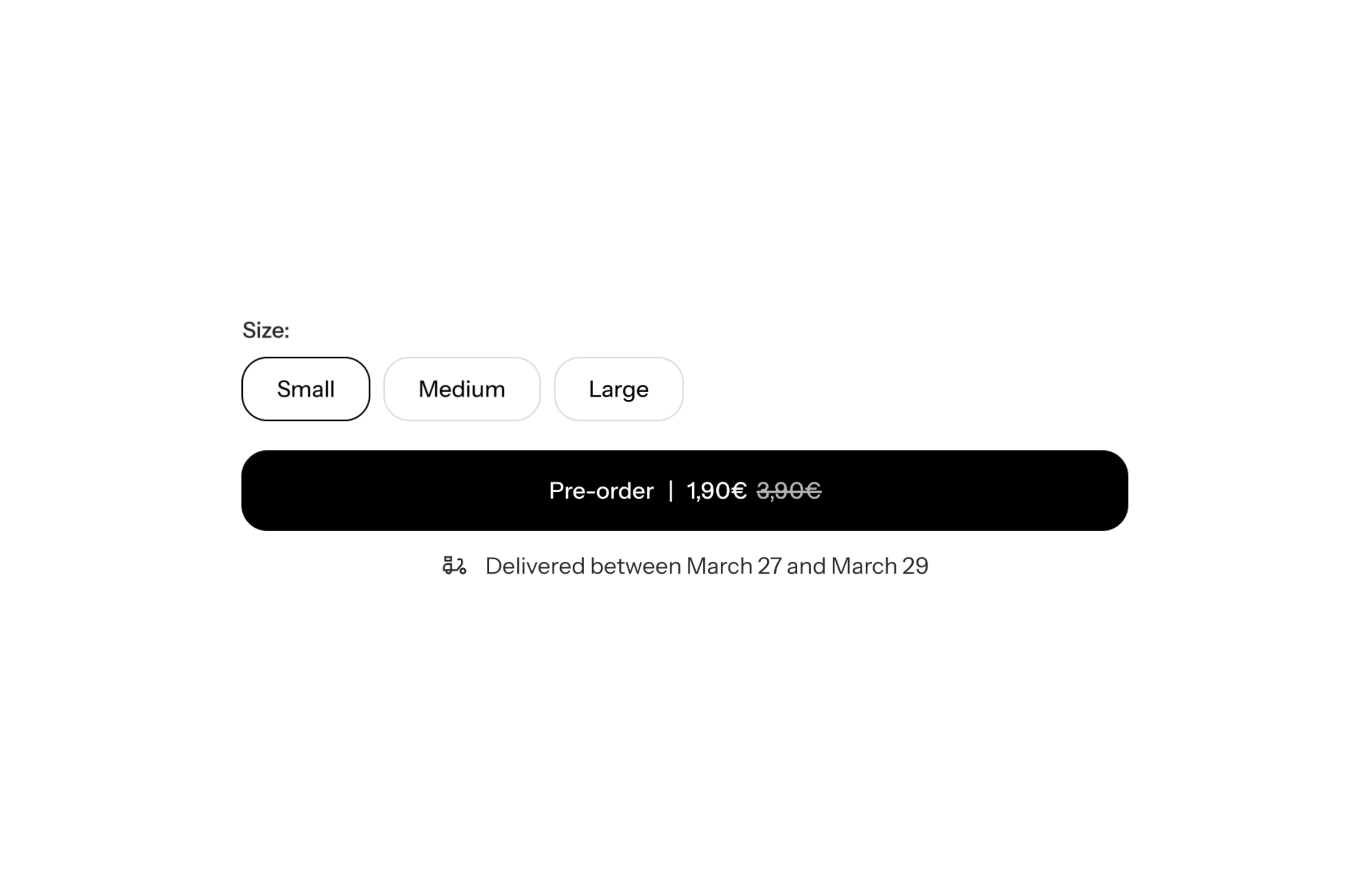
A Shopify theme with a pre-order system lets you keep selling a product that is out of stock, while making it clear to shoppers that they are placing a pre-order. In FullStack, pre-order mode is a setting on the add to cart button: it changes how the button looks when the variant is out of stock, and adds a custom message shown in the cart and at checkout.
A stockout on a product that sells well is revenue walking over to a competitor. The visitor was ready to buy, finds a greyed-out button and leaves. Pre-orders keep that sale: the customer pays now and receives the product as soon as you restock.
They also help with product launches: you gauge demand and collect revenue before production. But pre-orders only pay off if they do not disappoint. Shoppers need to know, before paying, that their parcel will not ship right away, and roughly when it will. Otherwise the sale turns into a support ticket, or a refund.
The setting lives on the Add to cart button block, inside the Product section’s form. Three settings:
On the Shopify side, two conditions must be met for the mode to apply: the variant’s inventory is 0 or below, and “Continue selling when out of stock” is turned on for that variant. The theme only changes the button display: Shopify is what allows selling without stock.
In pre-order mode, any button icon is removed. The rest of the button settings still apply: price shown inside the button (show_price), style, and the sticky add to cart bar on mobile (enable_sticky_add_to_cart).
Turn on enable_preorder and keep enable_preorder_on_empty_stock_only: only sold-out sizes switch to pre-order, the others stay on regular purchase. Cart message: “Ships within 3 weeks”.
Open pre-orders with a ship date stated on the product page, a countdown to the end of the pre-order window, and a cart message that repeats the date.
Set the delivery estimate with realistic minimum and maximum lead times, and a pre-order message that explains production. Shoppers know what to expect before paying.
The theme’s pre-order mode is a display feature: it does not handle deferred payments, pre-order quantity caps or emails. Follow-up emails are set up in Shopify or your email tool, and partial or deferred payment requires a pre-order app. FullStack licensing and the free trial are on the pricing page.
Not for a simple pre-order: the add to cart button handles the display and the cart message. An app is still useful for advanced needs such as deferred payment.
Check that the variant’s inventory is 0 or below and that “Continue selling when out of stock” is turned on in Shopify.
In the cart and at checkout, through the preorder_cart_message setting on the add to cart button.
Rated 4.9/5 out of 200+ reviews



Rated 4.9/5 out of 200+ reviews