icon wand stars

Feature

Navigation

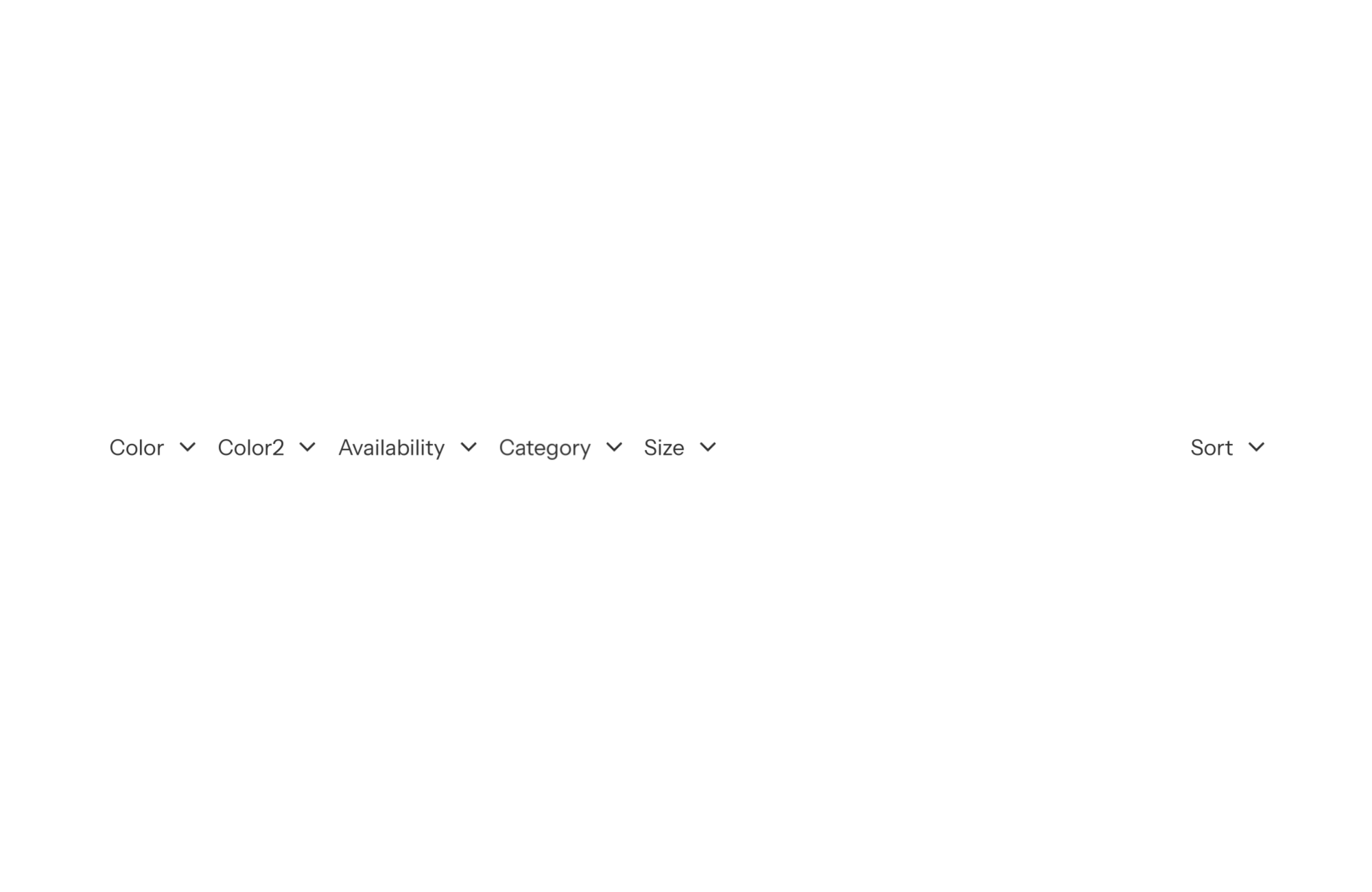
Shopify theme with collection filters at the top

The Fullstack theme offers over 100 features, distributed across more than 40 sections and over 60 blocks. All this, without compromising your brand's visual identity.
Shopify theme with collection filters at the top

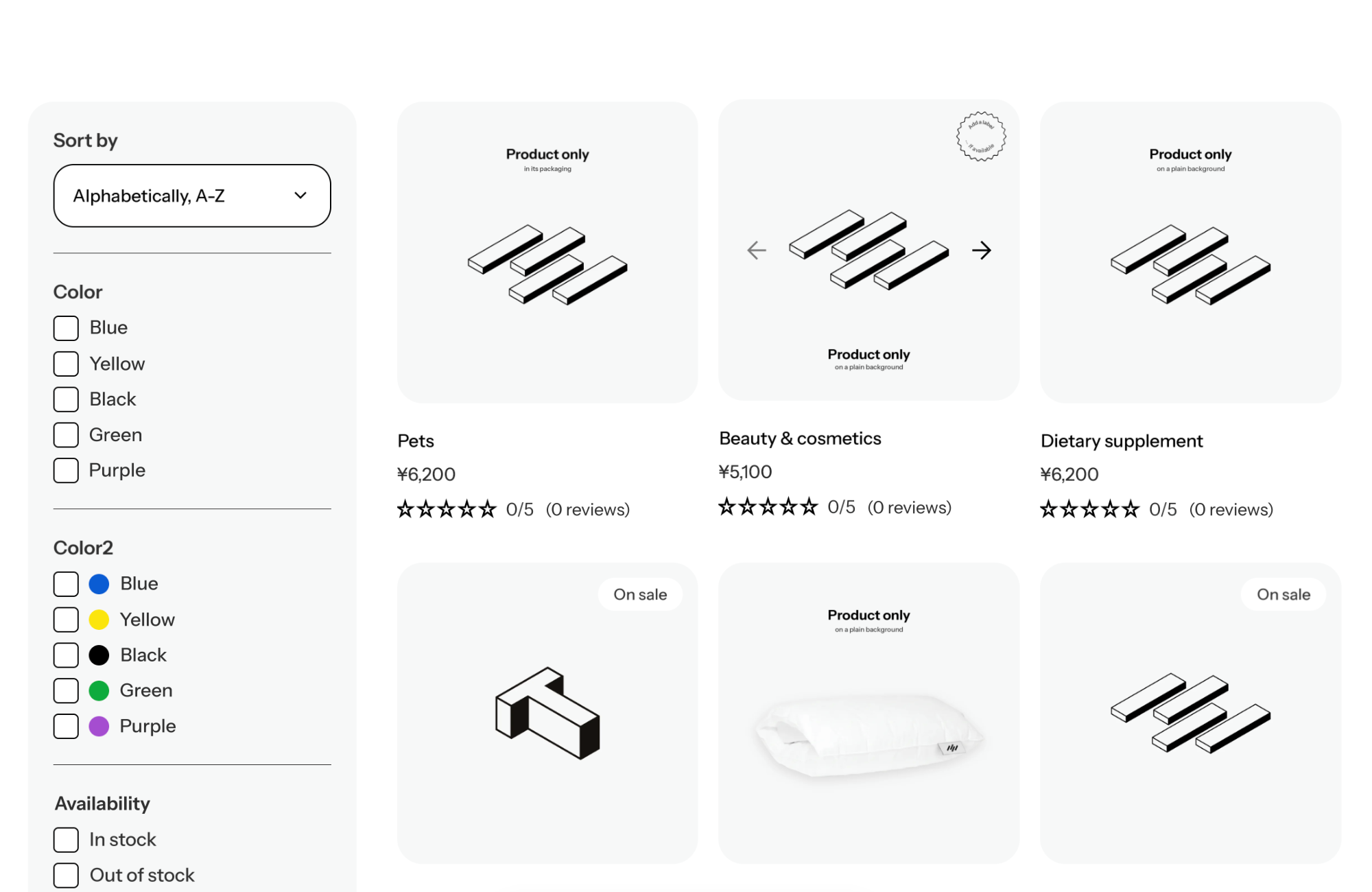
A Shopify theme with collection filters at the top lines filters up horizontally, right above the product grid: each filter (availability, price and so on) opens as a dropdown, and sorting sits on the right. The grid keeps its full width and filters stay in sight. In FullStack, this is the inline mode of the Filters and sort block.
FullStack Skin demo store collection page with the filter bar above the grid and the Availability filter open
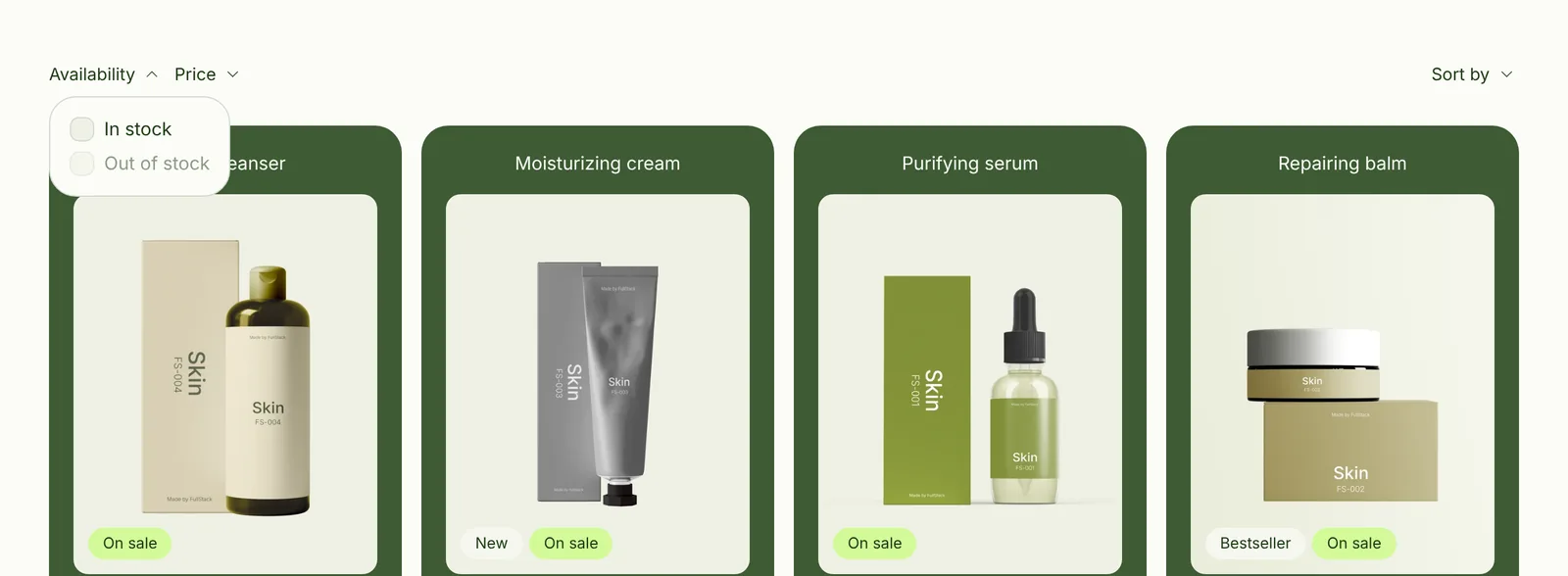
On the FullStack demo store: the filter bar above the grid, with the Availability filter open and sorting on the right.

Why inline filters above the grid

Inline filters sit halfway between the two other layouts. Unlike a side column, they take no width away from the grid: product cards stay large. Unlike a drawer, they stay visible: shoppers instantly see they can filter by price or availability, with no button to hunt for.

This layout suits short to mid-size catalogs with a few simple criteria. That covers many direct to consumer brands (skincare, food, accessories): a clear range, polished visuals, and two or three filters that do the job.

How inline filters work in FullStack

The filter bar is the Filters and sort block (filters-and-sort), rendered automatically by the main section of the collection page. In the theme editor, on the Collection template:

  • Display mode (display_mode) set to inline. The default is sidebar, so you need to change it.
  • Show filters (show_filters) and Show sorting (show_sorting): independent, so you can show sorting only, for example.
  • Show on (show_on_display): desktop and mobile, desktop only or mobile only.

Each filter becomes a dropdown in the bar. The filter list is set up on the Shopify side with the Search & Discovery app: the theme shows what Shopify provides.

What inline filters work with in FullStack

  • Full width grid: grid_columns from 2 to 5 on desktop, 1 or 2 on mobile, and products_per_page from 10 to 40 (24 by default). With no side column, 4 columns stay comfortable.
  • Composable product card: on the Skin demo, the card is wrapped in a colored card, with badges, compare at price and an add to cart button. You build it once for the whole grid.
  • Navigation section: placed above the filter bar, it adds shortcuts to your collections. See the navigation buttons section: browse by category at the top, fine filtering right below.

Examples by store type

Skincare: a short range

Just like the Skin demo store: inline mode, availability and price filters, sorting on the right, a 4 column grid. Shoppers see products first, with filters within reach.

Supplements or gourmet food: filter by need

Create a metafield filter in Search & Discovery (benefit, diet, flavor): it shows up as one more dropdown in the bar. Add a row of navigation buttons above it, pointing to your themed collections.

Accessories: sorting first

If shoppers mostly compare prices or new arrivals, keep show_sorting on and cut filters down to the essentials. The bar stays light and fits on a single line.

Best practices

  • Stick to a few filters: beyond that, the bar gets crowded and a side column reads better.
  • Name your filters clearly in Search & Discovery: the label is all shoppers see before opening the list.
  • Take care of the manual collection order in Shopify: the first visible products are still the most seen.
  • Check the mobile view in the editor before publishing.

Limits to know

For a deep catalog with many criteria (sizes, colors, materials), an inline bar fills up fast: go for side filters or a drawer instead. The block only exists on the Collection template, with one layout per template. The filters themselves depend on your Shopify setup, not on the theme. Licensing details are on the pricing page.

FAQ

How do I show filters above products in FullStack?

In the theme editor, open the Collection template, select the Filters and sort block in the main section and set the display mode to Inline.

How is this different from side filters?

The sidebar takes 25% of the width at all times and suits deep catalogs. The inline bar leaves the full width to products and suits shorter catalogs.

Can I add custom filters?

Yes, through Shopify’s Search & Discovery app, for example based on product metafields. They then show up in the bar.

Discover other features

Compare FullStack: Dawn · Horizon · Shrine · Booster · Debutify · Elixir · Elevate · Hyperflow · Phantom · Rocket

They built their store with FullStack

Rated 4.9/5 out of 200+ reviews

stars-5

The best rated Shopify theme

Discover the feedback from our incredible customers who are performing better, every day.
stars-5
It really is the best Shopify theme.
This theme includes so many features that you will hardly need external paid apps, which will lighten your site, increase its speed, avoid and above all save you money.

In addition, the customer service is just top notch, they respond quickly and very, very effectively to any question and it's just great to be supported like that when you launch your store.
‍
I even have the feeling that the theme is not expensive enough considering everything it offers.
Matheo B
August 10, 2025
stars-5
A 10/10 in terms of quality of exchange and service for the support team; it is more than a pleasure to call on them (almost like wanting to create problems on purpose to discuss 🤣).
‍
And, honestly, I have rarely seen a theme as crazy as the one they offer us; V2.0 🤩.
‍
Thanks for everything.
Tessa V
Nov 17, 2025
stars-5
“I would have liked to know this theme sooner in person... it's a huge time-saver.

The theme is optimized as possible, it looks very professional and it is so intuitive!

But I would still like to highlight customer support. Never seen such quick feedback (my question sent by email at 6 pm, an answer the same evening).

So thanks to Nezha who was efficient and super fast, she solved my problems in no time and especially her little word of encouragement warmed my heart and boosted me [...]”
Jade B
Sep 21, 2025
stars-5
“Frankly, top theme 👌

Super well designed, easy to learn even for beginners.

The team is very responsive, we always get quick feedback and that makes creating the site a lot easier.

Really a big plus, I recommend without hesitation!”
Feriel
Sep 18, 2025
stars-5
I am really impressed by this theme! It is super intuitive, easy to handle and above all very aesthetic. We feel that everything has been designed to facilitate the creation of the site: the functionalities are numerous, useful, and very well integrated.

A huge strength: customer service. A big thank you to Nehza, who answered all my questions with incredible responsiveness. Always available, very professional and really effective. We feel that they are taking the time to help!

I recommend 100% 🔥🚀
Claire C
Nov 25, 2025
stars-5
“It's clearly the best Shopify theme I've ever seen. Even though the previous version was great, 2.0 is a glitch! Thanks for the flexboxes 💜

The theme is super well built, very easy to use, with many clear tutorials, full of features that normally require the installation of applications. There is even a “Design System” section to make it easier for us to configure colors, fonts, etc.

Even their team is super responsive, if necessary they are really attentive. In short, there is so much to say, just remember that it is a complete theme that will allow you to save time and especially money! Thanks again 🏾”
Fatou D
Oct 10, 2025
stars-5
“My experience with Fullstack has been super positive!

This is not the first time I have used Shopify, but the other themes are quite limited in terms of possibilities and customer experience.

The Fullstack theme met all my expectations, especially on all the features I wanted for my site!

And the customer service is just top notch, as soon as you have a question, you have an answer in less than 12 hours, the service is super responsive and very professional!”
Mégane K
Oct 9, 2025
stars-5
The experience with Fullstack is great!
‍
This is my first time using Shopify, and the theme is well built to be intuitive.

And the customer support is just at the top, for all questions, the service is super responsive and very professional, the answer always arrives within 24 hours!
Geoffrey S
Nov 12, 2025
stars-5
I am thrilled with the Fullstack theme!
The design is modern, fluid and is exactly what I was looking for, best investment.

But what really makes the difference is their support: highly responsive, patient, professional and very kind. I was guided and supported on several points, and everything was resolved quickly.
‍
I 100% recommend it to anyone looking for a reliable theme, and especially well-followed!
Rahma M
August 1, 2025
stars-5
“It's clearly the best Shopify theme I've ever seen. Even though the previous version was great, 2.0 is a glitch! Thanks for the flexboxes 💜
‍
Very good theme. Truly high-quality service from passionate people who respond quickly to our questions.
‍
A big thank you to Nezha for her help and valuable advice :)
KT
Oct 10, 2025
stars-5
It's “THE” Shopify theme! This version 2 is at the top

The theme is very easy to learn, with clear tutorials.

The team is efficient and responsive

Thanks again to the Fullstackers
Prêtes à briller
Oct 24, 2025
stars-5
Very very good theme honestly the quality/price ratio is great, a lot of features perfect for creating different shops.
‍
The customer service is top notch.
Auguste
Oct 28, 2025
stars-5
I want to thank the Fullstack team for their professionalism and exemplary responsiveness. To each question, I received a quick, clear and above all human answer.

You feel a real benevolence behind their support, and that makes all the difference when you embark on a project like mine.

Thank you for your support, your listening and your efficiency. That's exactly what you need to move forward with confidence 💖
Chapey
Jul 25, 2025
stars-5
Great experience:
- simple installation
- a product that is both complete and accessible
- exceptional designs
- details to help us integrate cross-sells
- a harmony that is created automatically
- Short template at the top and at a lower cost
Matthieu C
Dec 4, 2025
stars-5
“A serious company, a team available for any questions and responsive. We know why we are taking this service, we are not lost in nature, the quality is there!

I tried to get started with the free Dawn theme and I had so much trouble with all the applications to install... switching to full stack, it's day and night: I save time on everything because everything is clear and optimized.

Time is money, I would have liked to have known them before...”
Sarah
Sep 9, 2025
icon arrow back
icon arrow forward

Rated 4.9/5 out of 200+ reviews

stars-5

Tired of being limited by your theme ?

We created the best Shopify theme on the market, that's it.
icon dashboard customize
Easy to pick up
5-minutes setup
icon design services
No code needed